Plan Ahead: Upcoming System Downtime
Glacier Tax Compliance will be unavailable from Tuesday, December 30 through Monday, January 5 for year-end maintenance. Administrators and employees will not be able to access the system during that time.

On This Page:
- Information for Employees:
- Frequently Asked Questions
- Information for Glacier Administrators:
Overview
Glacier Tax Compliance is a secure, web-based application used by the UW to determine the correct taxation on wages for Foreign National employees. Only Foreign Nationals present in the US should submit information in Glacier Tax Compliance.
Information that a Foreign National must provide in Glacier Tax Compliance includes:
- Visa start and end dates
- Passport page with visa stamp
- Country of residence
- Country of citizenship
- U.S. address
- Foreign address
- Social Security number or ITIN
Based on this information, the UW is then able to determine if the Foreign National:
- Is eligible for any federal withholding tax exemptions via a tax treaty
- Has passed a substantial presence test
- Has become an alien resident for U.S. tax purposes
- Is exempt from FICA taxes (Social Security/Medicare) based on USCIS NRA rules
Failure to complete Glacier Tax Compliance information and provide documents to the Payroll Office may result in inaccurate tax withholding and/or loss of tax treaty exemptions.
Information For Employees
Accessing Glacier Tax Compliance and Assembling Your "Glacier Packet"

Enter your information in Glacier Tax Compliance even if you don’t yet have an SSN or ITIN.
Refer to "What should I do if I don't have an SSN or ITIN?" in the Frequently Asked Questions section of this page for more information.
Once you have been hired to work and entered as an employee in Workday, you will receive an invitation via email to set up your UW Glacier Tax Compliance account:
- Open the email sent to you by Glacier; the From: address of that message is support@online-tax.net. This is not a spam email. The email will instruct you on how to access Glacier Tax Compliance, submit your information, and provide a temporary login and password. You may change your login and password at this time.
Login to Glacier Tax Compliance using the button below.
- Enter your answers in Glacier Tax Compliance per the instructions in the Glacier Tax Compliance Guide for Employees guide.
- After completing your Glacier entry, print (single-sided, please!) all of the documents that Glacier generates, including the Glacier Tax Summary Report.
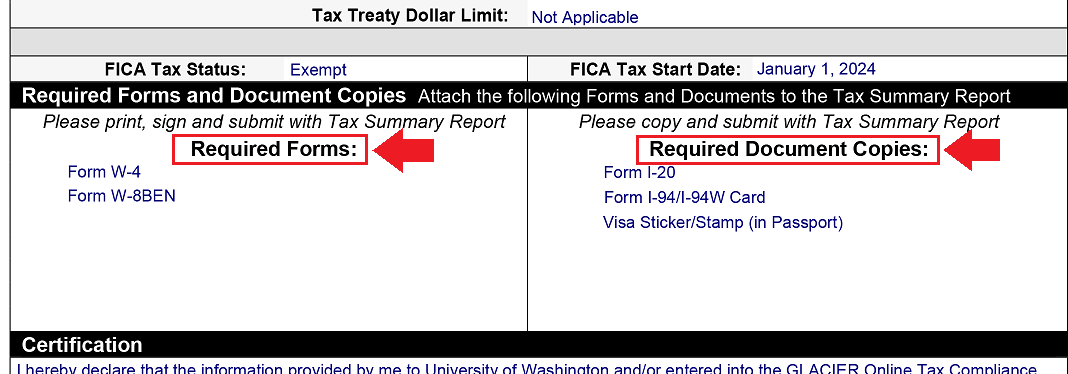
- Locate the Required Forms and Document Copies section of your Glacier Tax Summary Report. Prepare the documents listed in the Required Forms and Required Document Copies boxes, highlighted in the below image; note that the documents listed on your Report may differ from those shown here.
- If applicable, gather the following additional documentation:
- If you are working with an Employment Authorization Card, please include a copy of your Employment Authorization Card. (Even though this is not listed under Required Document Copies on the Tax Summary Report, it is still required.)
- If your SSN was recently issued to you or has not yet been entered into Workday, please submit a copy of your Social Security card along with your Glacier paperwork. You will also need to contact the UW Registrar's Office at registra@uw.edu so they can update your student record; DO NOT include your SSN in your email.
- Verify that you have signed and dated all documents listed in the Required Forms box. Be sure to use a handwritten signature - electronic signatures are not accepted.
- Sign and date the Glacier Tax Summary Report.
- Mail the paperwork from steps 4-8 (your "Glacier packet") to the following address (you may use UW campus mail or any US mailing service convenient for you):
Payroll Office
UW Tower, Floor O-2
4333 Brooklyn Avenue NE
Box 359555
Seattle, WA 98195
Attn: Glacier Administrator
- Note that your Glacier packet must be mailed - electronic submission of your paperwork is not permitted, owing to the confidential information it contains.
Tax Treaties - Eligibility, Paperwork, and Renewal
A tax treaty is an agreement negotiated between the United States and a foreign country to reduce double taxation on residents of the foreign country. The information you provide in Glacier Tax Compliance will help the Payroll Office determine if you are eligible for any tax treaties that will exempt you from having to pay federal withholding taxes.
- Lists of current wage tax treaties and Scholarship/Fellowship tax treaties are available in IRS Publication 901. Carefully review the eligibility criteria specified, including in footnotes.
- Refer to IRS Publication 519 for information regarding taxes for nonresident aliens.
- Information on which countries have tax treaty agreements and the tax treaty details are available on the IRS website.
Generating your tax treaty eligibility paperwork
Glacier Tax Compliance generates the tax treaty-related paperwork that you need to include in your Glacier packet:
- IRS Form 8233 - Glacier Tax Compliance will generate Form 8233 and a Form 8233 attachment that is a verification of your tax treaty eligibility. Both forms must be signed and dated, if you have wage payments that have been determined to be exempt from federal withholding tax.
- IRS Form W-8BEN - Glacier Tax Compliance will generate this form if you are determined to be eligible for a Scholarship/Fellowship tax treaty.
There are several requirements to be eligible for a tax treaty benefit for federal withholding taxes. If Glacier Tax Compliance determines that you are not eligible for a tax treaty, no tax treaty-related forms will be generated. However, you can still claim the exemption as part of the personal tax return you file with the IRS.
Every November, foreign nationals who might again qualify for a federal withholding tax exemption on their wages must renew their Form 8233 (and the required attachment) for the upcoming year and send that paperwork to the Payroll Office for processing. Note that, to be eligible to renew your Form 8233, you must:
- Have a social security number or ITIN entered in Glacier Tax Compliance, and
- Be a nonresident alien for tax purposes at the beginning of the new calendar year, and
- Have work authorization status that has not expired, or will not expire before the end of the current year.
Glacier will notify you via email when the renewal period has opened. The email you receive will provide you with step-by-step instructions for renewing your paperwork via Glacier Tax Compliance.
To ensure processing in time for your first paycheck in January, your paperwork must be:
- printed single-sided, and
- signed where indicated, including the Tax Summary Report Update cover page, and
- received by the Payroll Office by the deadline indicated in the renewal email. Refer to step 9 of the Accessing Glacier Tax Compliance and Assembling Your "Glacier Packet" section above for the mailing address.
Frequently Asked Questions
Getting Help
- What should I do if I don't have an SSN or ITIN?
Enter your information in Glacier Tax Compliance even if you don’t yet have an SSN or ITIN - refer to the step-by-step procedure in the "Accessing Glacier Tax Compliance and Assembling Your 'Glacier Packet'" section, above.
If you are receiving payments through UW Payroll, you must apply for a Social Security Number (SSN) as soon as possible; if you are not able to receive an SSN, you must apply for an Individual Taxpayer Identification Number (ITIN):
- To apply for an SSN, review the information on the UW International Student Services website.
- To apply for an ITIN:
- Students – visit the UW International Student Services website
- Staff/faculty – visit the UW Tax Office website
Then, once you receive your SSN or ITIN, you must take the following actions to ensure the appropriate systems and records are updated:
- Contact your department’s HCM Initiate 2 to ask them to enter your SSN/ITIN in Workday.
- Log into Glacier Tax Compliance (see "Accessing and Using Glacier Tax Compliance," below) and enter your SSN or ITIN. This will allow Glacier to recalculate your tax status and determine if you are eligible for a federal withholding tax exemption through any tax treaties. You will need to print, sign, and send an updated Glacier packet, including a copy of the SSN card or ITIN notice, to the Payroll Office.
- Lastly, if you are a student, the UW Registrar's Office will need your SSN/ITIN for tuition reporting purposes. Contact them at registra@uw.edu; DO NOT include your SSN in your email.
- Where can I get help with using Glacier Tax Compliance?
In Glacier Tax Compliance, select the “online help” icon in the lower right section of the screen.
You can also email Glacier Tax Compliance support at support@online-tax.net. Note that it may take up to 2 business days to receive a response.
- Where can I get help with tax information appearing on my UW paycheck?
Please contact the Payroll Office, using the subject "Glacier Tax Compliance help."
- My immigration status has changed. What do I do?
First, you will need to update your information in Glacier Tax Compliance with the new work authorization information and send the new Glacier-generated paperwork to the Payroll Office.
Next, contact your department’s I-9 Coordinator for assistance to update your Form I-9 in Workday. Refer to the Completing Form I-9 in Workday section of the Foreign Nationals Payment & Tax Information page for instructions.
- Who do I contact about extending my work authorization?
If you are a student, please contact the UW International Student Services Office.
If you are academic personnel (faculty, research scholar, etc.), please contact the UW International Scholars Office.
Using Glacier Tax Compliance
- I have been in the US for more than 5 years and I know I am a resident alien for tax purposes. Do I still need to use Glacier Tax Compliance?
Yes. All foreign nationals receiving payments through Workday must use Glacier Tax Compliance to verify the tax status and to track work authorization documents. The Glacier Tax Summary Report and the required documents are kept for IRS audit purposes.
- Do I need to complete Glacier Tax Compliance if I am working outside the US?
No. Only foreign nationals present in the US should complete Glacier Tax Compliance. Foreign nationals with nonresident alien tax status, working outside the US will need to work with their department to complete the Certificate of Foreign Status and Department Confirmation letter. Instructions and links to the required forms can be found in the "Ensuring Correct Taxation If Working Outside the US" section of the Foreign Nationals Payment & Tax Information page.
- I am a DACA recipient. Do I need to complete Glacier Tax Compliance?
Yes. DACA recipients are foreign nationals for immigration purposes. The citizenship status is not as a permanent resident or US citizen. The UW requires all foreign national employees working in the US to complete Glacier Tax Compliance. Contact the Payroll Office if you need help completing Glacier Tax Compliance.
Note that Glacier Tax Compliance requires a foreign address. If a permanent foreign address is not available, DACA recipients should enter N/A in the street address line, and choose their city and country of origin.
- I have applied for an extension of my work authorization. What do I put in Glacier Tax Compliance?
If you have received the I-797C receipt from USCIS, contact the Payroll Office to confirm that the extension applies to your work authorization. The Payroll Tax and Accounting team will provide specific instructions on the dates to enter in Glacier Tax Compliance and the documents that must be sent to the Payroll Office.
A list of work authorization documents eligible for a 180-day extension is available on the USCIS website.
- Is the information in Glacier Tax Compliance shared with anyone else?
No. The information in Glacier Tax Compliance is confidential and not shared with other agencies. Access to the information in Glacier Tax Compliance is only available to the UW department Glacier Administrator and the UW Payroll Office.
- Do I need to update my information in Glacier Tax Compliance if it has changed since I left the UW?
No. The information in Glacier Tax Compliance should NOT be changed. This is the information that is on file while you were working at the UW. Any changes to the information in Glacier Tax Compliance will result in changing the status of your Glacier account and a new Glacier paperwork will have to be sent to the Payroll Office.
Tax Treaties
- I believe I’m eligible for a federal withholding tax exemption through a tax treaty but Glacier Tax Compliance says I’m not. What should I do?
The UW follows the guidelines set by Glacier. The Payroll Office applies any tax treaty-based federal withholding tax exemptions to foreign nationals' paychecks as a courtesy. Even if Glacier doesn't indicate an exemption, you can still claim the exemption when you file your personal tax return with the IRS.
- Can I send my tax treaty paperwork to the Payroll Office electronically?
No. Only paper version of the tax treaty forms with your original handwritten signature are accepted; paperwork cannot be sent as an email attachment or uploaded to a file sharing service for retrieval.
- I didn’t turn in my tax treaty renewal forms by the deadline. What should I do?
Please mail your paperwork to the Payroll Office as soon as possible - refer to step 9 of the Accessing Glacier Tax Compliance and Assembling Your "Glacier Packet" section above for the mailing address.
Your exemption will be applied to your paycheck for the pay period after your forms have been received and reviewed.
- I turned in my Glacier paperwork, but received a notice saying that I need to send in a new tax treaty form. What should I do?
The notice you received is about renewing your tax treaty exemption for next year. The Form 8233 and 8233 attachment must be renewed each year.
If you want to apply the tax treaty exemption for your pay in 2026, log into Glacier Tax Compliance, and select “Complete My Information for Tax Treaty.” Print the forms as single-sided (one per page) and sign, and date all forms with your handwritten signature. Send the signed tax treaty forms to the Payroll Office by the deadline listed in the notification.
- I didn’t receive a notice to renew my tax treaty eligibility paperwork. What should I do?
Review your record in Glacier Tax Compliance as well as the information in the Tax Treaties - Eligibility, Paperwork, and Renewal section above.
If you still have questions, contact the Payroll Office with the subject line "Tax Treaty Renewal."
- Do I need to renew my Form W-9?
No. The Form W-9 is issued to resident aliens for tax purposes if there is an agreement between the US and their home country. Your W-9 does not need to be renewed each year.
Taxes
- How do I know my tax status?
Glacier Tax Compliance will determine your tax status. The Tax Summary Report will show the tax status in the section titled Tax Residency Status.
Note: Being a resident alien for tax purposes does not change your immigration status. Non-US citizens/permanent residents are foreign nationals regardless of tax status.
- Social Security and Medicare taxes were deducted on my paycheck. Should these taxes be exempt for foreign national students?
Social Security and Medicare taxes, also called FICA tax exemptions, are determined by Glacier Tax Compliance based on the tax status as a nonresident alien or resident alien for tax purposes.
For questions regarding FICA tax deductions, contact the Payroll Office.
- Can I get a refund for the taxes that were deducted before I turned in my Glacier Tax Compliance paperwork?
The UW does not refund federal withholding taxes deducted before the tax treaty forms are received. However, you can claim the federal withholding tax exemption when you file your personal tax return with the IRS. Any refunds will be issued to you by the IRS.
FICA tax (Social Security and Medicare) refunds are determined after the Glacier Tax Compliance paperwork has been received in the Payroll Office.
- What is the difference between a 'nonresident alien' and a 'resident alien for tax purposes'?
If you are a foreign national (not a U.S. citizen/permanent resident), you are considered a nonresident alien for tax purposes unless you meet the substantial presence test for the calendar year (January 1-December 31). The tax status is determined based on time spent in the US and visa type. Additional information is available on the IRS website.
Information For Administrators
Responsibilities
Departments that enter Foreign National employees (staff, faculty, students) into Workday should designate a Glacier Administrator. The Glacier Administrator is responsible for:
- Adding new Foreign National employees* to Glacier Tax Compliance
- Monitoring whether a Foreign National employee has submitted their required information to the Payroll Office
*Foreign Nationals that will not be receiving payments through Workday (i.e. Contingent Workers, Unpaid Academics, individuals with 100% PDR compensation) do not need to complete Glacier Tax Compliance.
Obtaining Administrator Access to Glacier Tax Compliance
Due to the sensitive information in Glacier Tax Compliance, the Payroll Office provides access to one Administrator per department; exceptions are made on a case-by-case basis.
Training is required before administrator access will be provided. To arrange a 30-45 minute training session, contact the Payroll Office with the subject “Glacier Admin Training Request.” Please include your unit/department name, and whether you will be replacing your unit's current Glacier Tax Compliance Administrator.
Using Glacier Tax Compliance
After completing the required training, Glacier Administrators can Contact the Payroll Office if you need step-by-step instructions on adding employees and determining the status of their Glacier paperwork.