Common Reports
The following are commonly used reports found in Workday and the BI Portal.
Workday: Grant Budget Vs. Actuals R1234
How to Access
Login to Workday and search for "R1234".
How to Use
Review to the instructions in the pop-up window that appears.
Things to Know
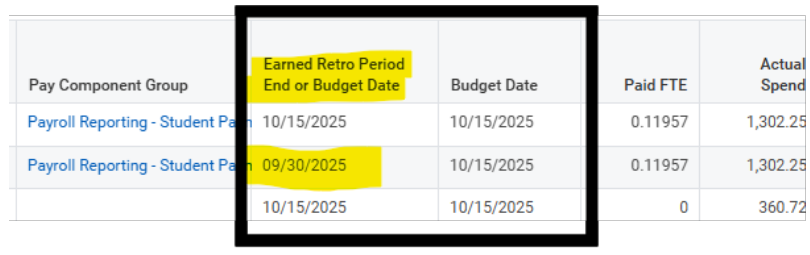
- As of September 2026, the R1234 report accurately displays the Earned Retro Period End or Budget Date for Retro Pay transactions.
Workday: Find Salary Journal Lines with Worker Details R1269.1
How to Access
Login to Workday and search for "R1269.1".
How to Use
Watch this video to see a demonstration on how to use this Workday report: Demo - Running R1269.1 Report to Reconcile ECC Statements (YouTube)
Things to Know
- As of September 2026, the R1269.1 report accurately displays the Earned Period End Date and Retro Period for Retro Pay transactions.
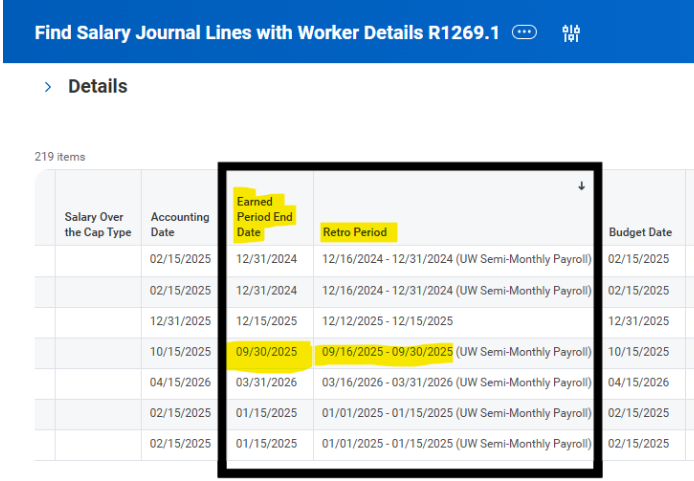
- Use this custom report to find one or more journal lines with worker related data elements (if security permits).
- Result set is limited to Payroll Accounting Adjustment and Payroll Actual Accrual Journal Sources and wage and salary ledger accounts (Financial LAS 05 Salaries and Wages).
- Required prompts: Company, Ledger, Year, Period Optional prompts: Employee, Worktags
BI Portal: Find Salary Journal Lines with Worker Details
Note: This report can take several minutes to load.
How to Access
Click on this link to access the report in the BI Portal: Link to Report
How to Use
Users can search by many different data points. Here are two suggested ways to run this BI Portal report:
Search for activity by Faculty Member for a Specific Reporting Period (for Effort Statement pre-review)
- Company: Select all
- Fiscal Period: Select each period since the start of the statement's reporting period
- Employee Detail By: Employee
- Employee Additional Filter: Enter first name then last name (“Joe Smith”)
- Employee Filter Value: Select the individual’s name in the dropdown (based on EID)
- Click View Report
- Export to Excel using the “CSV (comma delimited)” option under the disk icon (recommended)
Search for activity by Grant Worktag for a Specific Reporting Period (for Project Statement pre-review)
- Company: Select all
- Fiscal Period: Select each period since the start of the statement's reporting period
- Grant Additional Filter: Enter the grant worktag ID (GR######)
- Grant: Select the grant worktag in the dropdown
- Click View Report
- Export to Excel using the “CSV (comma delimited)” option under the disk icon (recommended)
Things to Know
This report is similar to the Workday R1269.1 report with a few differences:
- The BI Portal report provides retro pay data (dollar amounts and Earned Period End Dates) for a larger audience.
- Some fields have different labels, for example:
- An employee's name is "Worker" in the R1269.1 report and "Preferred Name" in the BI Portal report.
- An employee's UW Employee ID Number (EID) is "Worker Id" in the R1269.1 and "Employee ID" in the BI Portal report.