- Workday Payment Options
- Incorrect/Lost/Damaged Check Procedure
- Payment Tracking
- Payment Returns and Rejections
- ACH Verification
Workday Payment Options
| Note | Direct Deposit/ACH |
|---|---|
| Available to | All traveler types |
| Account type | Domestic US bank accounts |
| Processed by | Banking & Accounting Operations |
| Processing time | 2-5 business days (sending payment and deposit) |
| Reimbursement module | Spend Authorizations (Travel Advances), Expense Reports, Miscellaneous Payments |
| Manage information | Employees: Workday Payment Elections (Travel & E-Reimbursement)1 Non-Employees: Miscellaneous Payee profile (Banking Information) |
| Verification documentation | Employees: TBD Non-Employees: Documentation verifying ACH information will be required |
1Travel & E-Reimbursement payment elections will default to the account the employee has set for payroll and may be set as a different account for travel reimbursement.
| Note | Check |
|---|---|
| Available to | All traveler types |
| Account type | All accounts |
| Processed by | Creative Communications (Mailing Services) |
| Processing time | 1-3 business days to print and mail 1-3 business days to process (domestic) Varying time to process depending on bank (foreign) |
| Reimbursement module | Spend Authorizations (Travel Advances), Expense Reports, Miscellaneous Payments |
| Manage information | Employees: Workday Personal Information Non-Employees: Miscellaneous Payee profile (Contact Information) |
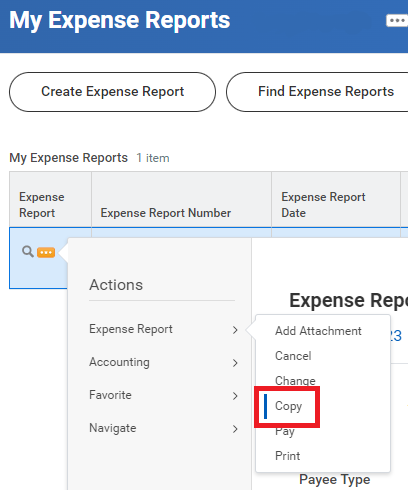
| Lost/Missing/Damaged check | Proceed with the Check Cancellation procedure. For Expense Reports, departments can create a copy of the canceled ER to expedite the creation process.2 |
2Find the previous ER # either through the search bar, R1126 Find Expense Reports OR the Expenses Hub. Use the related actions icon ( ) > Actions > Expense Reports > Copy. Creating a new ER from a copy does not include attachments, comments or additional context in fields that have free-form text.
| Note | Wire |
|---|---|
| Available to | Foreign National, Non-employee travelers |
| Account type | Foreign bank accounts |
| Processed by | Banking & Accounting Operations, Accounts Payable Wires |
| Processing time | 5-10 business days |
| Reimbursement module | Miscellaneous Payments |
| Manage information | Non-Employees: Miscellaneous Payee profile (Banking Information)3 |
| Cost | $0 |
3Wire payments typically have longer processing times than the other payment options.
Payment Tracking
Spend Authorizations (Travel Advances):
| Information | Details |
|---|---|
| Tab name |  |
| Viewer |
|
| How to find |
|
Expense Reports:
| Information | Details |
|---|---|
| Tab name |  |
| Viewer |
|
| How to find |
|
Miscellaneous Payments:
| Information | Details |
|---|---|
| Tab name |  |
| Viewer | Miscellaneous Payment Data Entry Specialist |
| How to find | R1372 Miscellaneous Payment Search |
See Payment Status for additional Workday Payment Status information.
Payment Returns and Rejections
Payment returns and rejections may occur due to incorrect or missing banking information when using ACH or Wire.
Users who have been notified may follow the steps below based on the payee and payment rejection type:
| Scenario | Payee + Payment Type | Next Steps |
|---|---|---|
| 1 | Employee + Returned ACH5 |
|
| 2 | Non-employee + Returned ACH or Wire + Single Use Payee is NOT checked5   |
|
| 3 | Non-employee + Returned ACH or Wire + Single Use Payee is checked   |
|
5Scenarios 1 and 2: Effective September 1, 2026, the returned/rejected payments for travel reimbursements will remain open up to 60 days from the initial notification from Travel Services. If the payee's banking information has not been updated within this time period, the reimbursement request will be placed into Draft status for the department (MP) or employee (ER) to update the banking information at a later time. This policy will include unresolved returned/rejected payments for travel reimbursements prior to September 1, 2026.
| Payment Type | Quick Tips |
|---|---|
| ACH | Common ACH return codes:
|
| ACH/Wire | Users may receive a notification that the reimbursement payment was returned or rejected, but when viewing the request, may notice a Paid status and Reconciled reconciliation status. The combination of the two statuses do not determine if a payment was successfully deposited into the payee's account. |
| Wire | Wire requirements vary per country, please have foreign nationals contact their bank for the correct banking information to receive a wire payment from the United States of America in USD. |
| Check | See Returned Checks for checks that have been identified as not deliverable due to incorrect addresses or missing information. |
ACH Verification
Effective July 1, 2026, in compliance with new requirements enforced by the National Automated Clearing House Association (NACHA), the University will be implementing updated guidelines for ACH payments. These guidelines apply to all ACH payments issued by the University, auxiliary enterprises, and service centers to minimize exposure to ACH risk and protect the confidentiality of payee information.
Expense Reports will have a different process to be determined at a future date.
See the full policy on the UW ACH Risk Management & Compliance Policy (Banking & Accounting Operations).
The fraud prevention process for outgoing ACH payments applies only to transactions of $5,000 USD or greater ("ACH Transaction Threshold") involving new payees or any changes to existing payee banking information. BAO will review the ACH Transaction Threshold annually and may adjust it based on the effectiveness of the controls, emerging fraud trends, transaction activity, and other relevant risk factors.
When entering or updating a non-employee payee's ACH banking information in Workday, departments must obtain and attach documentation verifying the following account details:
- Bank routing number (ABA)
- Bank account number
- Account type (checking or savings)
- Payee name as it appears on the bank account
Acceptable forms of documentation include:
| Document | Details |
|---|---|
| Phone call (between payee and department) - previously established/independently sourced phone number |
|
| Official bank document - voided check | Check must state "VOID" and contain account details |
| Official bank document - signed bank letter | Letter must contain the bank's letterhead confirming account details |
| Redacted bank statement or online bank screen print | Screen print must contain account details |
Emails are not sufficient for verification, including bank information confirmation and requests or instructions to change banking information.
Miscellaneous Payment Job Aid (coming soon)
Non-Employee Travel Miscellaneous Payments that have an ACH payment type and amount of $5,000 or more will be reviewed by the Expense Partner (Travel Services) in accordance with the NACHA requirements.