Frequently Asked Questions
- Click question to view answer.
- Search all categories or a specific category selected from the list at right.
Payment Options
- Please fill out a Check Cancellation Request Form from UW Connect.
- Miscellaneous Payments:
- Once the check has been canceled, the MP will be canceled in Workday. If payment is still due, Shared Environment should submit a new MP in Workday.
- Expense Reports:
- Once the check has been canceled, the ER will not be canceled in Workday and instead, the ER will re-run for settlement that evening.
- Refer to payment tracking information below to determine the check status
- Once the check has been canceled, the ER will not be canceled in Workday and instead, the ER will re-run for settlement that evening.
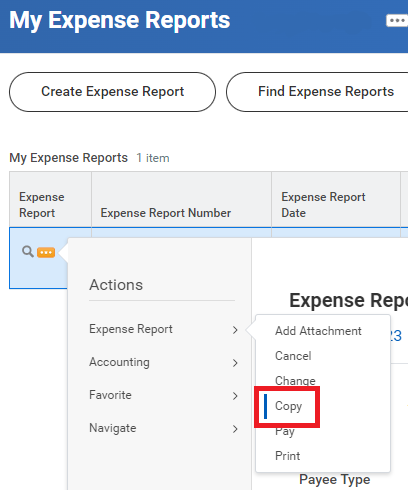
- To expedite, the 'copy' function can be used on the previous ER. Note that all attachments & comments will need to be re-added. Here are the instructions:
- Go to the Expenses App, click on Expense Reports, choose 'Approved' in the status field
- Select the Expense Report by clicking on the Related Actions icon (do not actually open the report)
- Under Expense Report, click on the 'copy' button
- A new copy of ER will open or you can find the new copy in your drafts under My Expense Reports
- Please attach all of the required receipts/documents, as they won’t be automatically copied
- Please re-input line item details and all overall comments, as they won’t be duplicated either
- Under the Handling Code field, choose "Campus Mail"
- Under the Miscellaneous Fields tag, under Miscellaneous Field 7, input the Box Number
- Have the check sent to yourself or your department
- Reroute the check through the USPS (US Postal Service)
Sending checks to foreign addresses is highly discouraged as they tend to take a long time to reach their destination and more often than not they are lost. Additionally, most foreign banks do not accept US checks. We recommend processing a foreign wire in lieu of a check to a foreign location.
Yes, approved must review both MPE and MPs if the ACH transaction is $5,000 or greater AND either of the following conditions applies:
- The payee is a new payee, OR
- The payee is an existing payee and their banking information is being updated
If both the transaction threshold and one of the conditions mentioned above are met, review of both the MPE and MP is required prior to approval.
Yes, but only if the bank information provided is supported with additional verification. Because DocuSign requests remain vulnerable to business email compromise (BEC) and rely on the same communication channel as the original request, additional independent verification is required. This may include the official bank documentation included in the DocuSign file or a callback to the payee using contact information already on file.
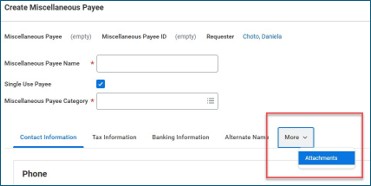
Include the verification document in the “Attachments” tab of the Miscellaneous Payee. When creating or editing a miscellaneous payee, choose "More", followed by "Attachments"
For recurring payments, no additional verification is needed as long as the banking information remains unchanged. If there are any changes to the banking information and the $5,000 threshold is met, updated verification must be obtained.
Workday has dual-factor authentication and is tokenized. Per NACHA's Supplementing Data Security Requirements, encryption, truncation, tokenization, destruction, or having the financial institution store, host, or tokenize the account numbers are among the options for Originators and Third-Parties to consider.
Expense payments, such as employee reimbursements, are also affected. However, because the banking information is generated through Workday HRP, a separate process must be developed. BAO and Payroll are working together to establish this process, which will be implemented at a later date