Frequently Asked Questions
- Click question to view answer.
- Search all categories or a specific category selected from the list at right.
Workday General
If the ER or MP is submitted and completely approved prior to 6:00pm, the check is issued the following day.
Expense Reports: Notify Travel Services (travel@uw.edu) with ER#, reimbursement amount and attach the completed wire form.
Miscellaneous Payments: When creating a miscellaneous payee profile, under the Banking Information tab, please input the wire information to the relevant fields (required fields will vary as every country has different requirements).
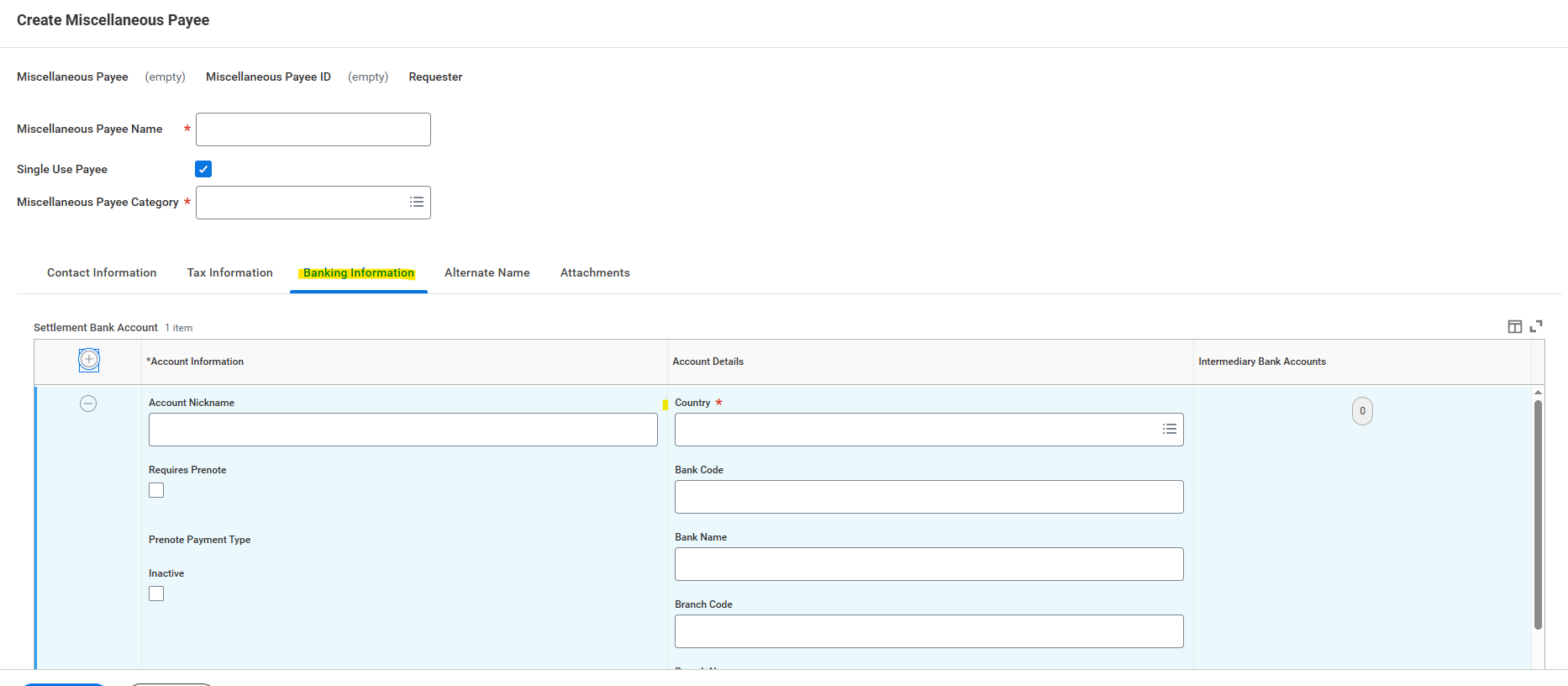
Once in the Miscellaneous Payment module, select Wire from the Payment Type options.
For any questions regarding wire payments, contact Banking & Accounting Operations.
Only use Workday Expense if you are reimbursing the traveler. Pertinent information to be included: proof of payment, lease/rent agreement and validation of commercial lodging facility. If reimbursing property management company contact Real Estate Office.
Yes, see the Scanning Policy set forth by UW Records Management for more information.
When reimbursing a new employee before their start date, please use the Miscellaneous Payment module. On the Non-Employee Claim Form, choose "Faculty/Staff Candidate" as their traveler type.
If the reimbursement is created on or after their start date, please use the Expense Report module.
If the taxes are not separated on the receipt, the whole amount is to be treated as the room rate. For domestic locations, the Room Tax in the Itemization may be input as $0.01, and the rest should be adjusted accordingly as the Room Rate.